
广告牌通过调用
在 3D 场景中定位的视口对齐图像,通过 BillboardCollection#add 创建并设置其初始属性。请勿直接调用构造函数。
BillboardCollection 创建和渲染。
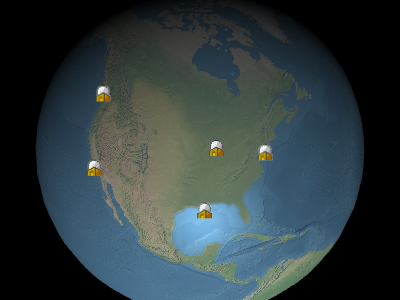
广告牌示例
Performance:
读取属性(例如 Billboard#show)的时间复杂度为常数。赋值操作的时间复杂度也为常数,但在调用 BillboardCollection#update 时会产生 CPU 到 GPU 的数据传输。每个广告牌的传输量相同,无论更新了多少属性。如果集合中的大部分广告牌都需要更新,使用 BillboardCollection#removeAll 清空集合并添加新广告牌可能比逐个修改更高效。
| Name | Type | Description |
|---|---|---|
options |
Billboard.ConstructorOptions | 描述初始化选项的对象 |
billboardCollection |
BillboardCollection | BillboardCollection 的实例 |
Throws:
-
DeveloperError : scaleByDistance.far 必须大于 scaleByDistance.near
-
DeveloperError : translucencyByDistance.far 必须大于 translucencyByDistance.near
-
DeveloperError : pixelOffsetScaleByDistance.far 必须大于 pixelOffsetScaleByDistance.near
-
DeveloperError : distanceDisplayCondition.far 必须大于 distanceDisplayCondition.near
Members
alignedAxis : Cartesian3
获取或设置世界空间中的对齐轴。对齐轴是广告牌向上向量所指向的单位向量。默认值为零向量,表示广告牌与屏幕向上向量对齐。
Examples:
// Example 1.
// Have the billboard up vector point north
billboard.alignedAxis = Cesium.Cartesian3.UNIT_Z;
// Example 2.
// Have the billboard point east.
billboard.alignedAxis = Cesium.Cartesian3.UNIT_Z;
billboard.rotation = -Cesium.Math.PI_OVER_TWO;// Example 3.
// Reset the aligned axis
billboard.alignedAxis = Cesium.Cartesian3.ZERO;
获取或设置与广告牌纹理相乘的颜色。这有两种常见用例:第一,多个不同的广告牌可以使用相同的白色纹理,每个广告牌使用不同的颜色来创建彩色广告牌。第二,可以使用颜色的 Alpha 分量使广告牌半透明,如下所示。Alpha 值为
红、绿、蓝和 Alpha 值由
0.0 时广告牌透明,1.0 时广告牌不透明。
default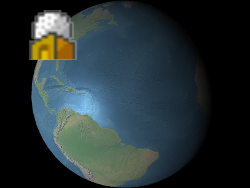 |
alpha : 0.5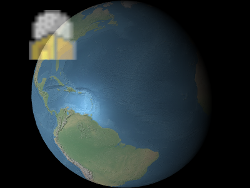 |
红、绿、蓝和 Alpha 值由
value 的 red、green、blue 和 alpha 属性指定,如示例 1 所示。这些分量的范围从 0.0(无强度)到 1.0(满强度)。
Examples:
// Example 1. Assign yellow.
b.color = Cesium.Color.YELLOW;
// Example 2. Make a billboard 50% translucent.
b.color = new Cesium.Color(1.0, 1.0, 1.0, 0.5);
获取或设置与相机的距离,超过此距离时禁用深度测试——例如,防止被地形裁剪。当设置为
undefined 或 0 时,始终应用深度测试。当设置为 Number.POSITIVE_INFINITY 时,从不应用深度测试。
-
Default Value:
undefined
distanceDisplayCondition : DistanceDisplayCondition
获取或设置指定此广告牌在距相机多远时显示的条件。
-
Default Value:
undefined
eyeOffset : Cartesian3
获取或设置在眼坐标系中应用于此广告牌的 3D 笛卡尔偏移量。眼坐标系是一个左手坐标系,其中
眼偏移通常用于在同一位置排列多个广告牌或对象,例如,将广告牌排列在其对应的 3D 模型上方。
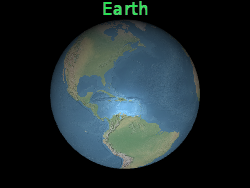
在下面的示例中,广告牌位于地球中心,但眼偏移使其始终显示在地球上方,无论观察者或地球的朝向如何。
x 指向观察者的右侧,y 指向上方,z 指向屏幕内部。眼坐标系使用与世界坐标和模型坐标相同的比例,通常为米。
眼偏移通常用于在同一位置排列多个广告牌或对象,例如,将广告牌排列在其对应的 3D 模型上方。
在下面的示例中,广告牌位于地球中心,但眼偏移使其始终显示在地球上方,无论观察者或地球的朝向如何。
 |
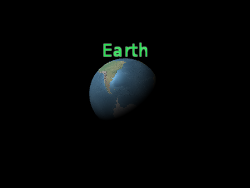 |
b.eyeOffset = new Cartesian3(0.0, 8000000.0, 0.0);
获取或设置广告牌的高度。如果未定义,将使用图像高度。
heightReference : HeightReference
获取或设置此广告牌的高度参考。
-
Default Value:
HeightReference.NONE
horizontalOrigin : HorizontalOrigin
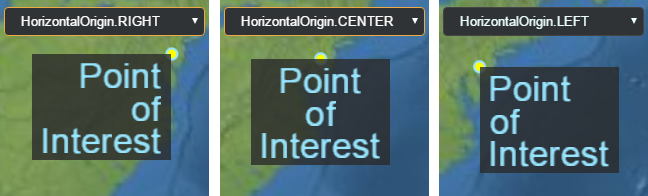
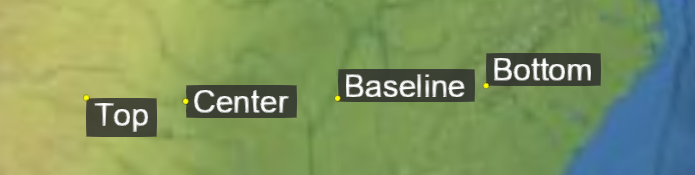
获取或设置此广告牌的水平原点,决定广告牌位于其锚点位置的左侧、中间还是右侧。
Example:
// Use a bottom, left origin
b.horizontalOrigin = Cesium.HorizontalOrigin.LEFT;
b.verticalOrigin = Cesium.VerticalOrigin.BOTTOM;
获取或设置拾取广告牌时返回的用户定义对象。
获取或设置此广告牌使用的图像。如果已经为给定图像创建了纹理,则使用现有纹理。
此属性可以设置为已加载的 Image、将自动作为 Image 加载的 URL、canvas,或同一广告牌集合中另一个广告牌的 image 属性。
Example:
// load an image from a URL
b.image = 'some/image/url.png';

// assuming b1 and b2 are billboards in the same billboard collection,
// use the same image for both billboards.
b2.image = b1.image;
pixelOffset : Cartesian2
获取或设置此广告牌原点在屏幕空间中的像素偏移量。这通常用于在同一位置对齐多个广告牌和标签,例如图像和文本。屏幕空间原点是画布的左上角;
广告牌的原点由黄色点指示。
x 从左到右增大,y 从上到下增大。
default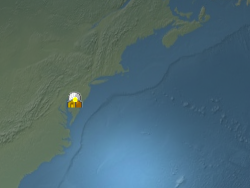 |
b.pixeloffset = new Cartesian2(50, 25);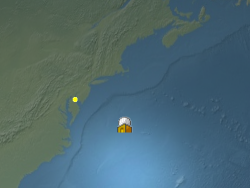 |
pixelOffsetScaleByDistance : NearFarScalar
获取或设置基于广告牌与相机距离的近远像素偏移缩放属性。当相机距离在指定的
NearFarScalar#near 和 NearFarScalar#far 的下限和上限范围内时,广告牌的像素偏移将在 NearFarScalar#nearValue 和 NearFarScalar#farValue 之间缩放。在这些范围之外,广告牌的像素偏移缩放保持钳制到最近的边界值。如果未定义,pixelOffsetScaleByDistance 将被禁用。
Examples:
// Example 1.
// Set a billboard's pixel offset scale to 0.0 when the
// camera is 1500 meters from the billboard and scale pixel offset to 10.0 pixels
// in the y direction the camera distance approaches 8.0e6 meters.
b.pixelOffset = new Cesium.Cartesian2(0.0, 1.0);
b.pixelOffsetScaleByDistance = new Cesium.NearFarScalar(1.5e2, 0.0, 8.0e6, 10.0);
// Example 2.
// disable pixel offset by distance
b.pixelOffsetScaleByDistance = undefined;position : Cartesian3
获取或设置此广告牌的笛卡尔位置。
当
true 时,此广告牌已准备好渲染,即图像已下载且 WebGL 资源已创建。
-
Default Value:
false
获取或设置旋转角度(弧度)。
获取或设置与广告牌图像像素尺寸相乘的统一缩放比例。缩放比例为
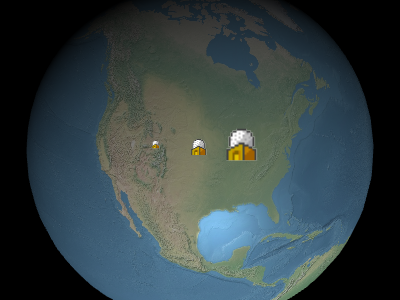
在上图中从左到右,缩放比例分别为
1.0 时不改变广告牌的大小;大于 1.0 时放大广告牌;小于 1.0 的正值缩小广告牌。
在上图中从左到右,缩放比例分别为
0.5、1.0 和 2.0。
scaleByDistance : NearFarScalar
获取或设置基于广告牌与相机距离的近远缩放属性。当相机距离在指定的
NearFarScalar#near 和 NearFarScalar#far 的下限和上限范围内时,广告牌的缩放将在 NearFarScalar#nearValue 和 NearFarScalar#farValue 之间插值。在这些范围之外,广告牌的缩放保持钳制到最近的边界值。如果未定义,scaleByDistance 将被禁用。
Examples:
// Example 1.
// Set a billboard's scaleByDistance to scale by 1.5 when the
// camera is 1500 meters from the billboard and disappear as
// the camera distance approaches 8.0e6 meters.
b.scaleByDistance = new Cesium.NearFarScalar(1.5e2, 1.5, 8.0e6, 0.0);
// Example 2.
// disable scaling by distance
b.scaleByDistance = undefined;
确定此广告牌是否显示。使用此属性来隐藏或显示广告牌,而不是将其从集合中移除后重新添加。
-
Default Value:
true
获取或设置广告牌尺寸是以米还是像素为单位。
true 表示以米为单位设置广告牌尺寸;否则以像素为单位。
-
Default Value:
false
splitDirection : SplitDirection
获取或设置此广告牌的
SplitDirection。
-
Default Value:
SplitDirection.NONEtranslucencyByDistance : NearFarScalar
获取或设置基于广告牌与相机距离的近远半透明属性。当相机距离在指定的
NearFarScalar#near 和 NearFarScalar#far 的下限和上限范围内时,广告牌的半透明度将在 NearFarScalar#nearValue 和 NearFarScalar#farValue 之间插值。在这些范围之外,广告牌的半透明度保持钳制到最近的边界值。如果未定义,translucencyByDistance 将被禁用。
Examples:
// Example 1.
// Set a billboard's translucency to 1.0 when the
// camera is 1500 meters from the billboard and disappear as
// the camera distance approaches 8.0e6 meters.
b.translucencyByDistance = new Cesium.NearFarScalar(1.5e2, 1.0, 8.0e6, 0.0);
// Example 2.
// disable translucency by distance
b.translucencyByDistance = undefined;verticalOrigin : VerticalOrigin
获取或设置此广告牌的垂直原点,决定广告牌位于其锚点位置的上方、下方还是中间。
Example:
// Use a bottom, left origin
b.horizontalOrigin = Cesium.HorizontalOrigin.LEFT;
b.verticalOrigin = Cesium.VerticalOrigin.BOTTOM;
获取或设置广告牌的宽度。如果未定义,将使用图像宽度。
Methods
computeScreenSpacePosition(scene, result) → Cartesian2
计算广告牌原点的屏幕空间位置,考虑眼偏移和像素偏移。屏幕空间原点是画布的左上角;
x 从左到右增大,y 从上到下增大。
| Name | Type | Description |
|---|---|---|
scene |
Scene | 场景对象。 |
result |
Cartesian2 | optional 用于存储结果的对象。 |
Returns:
广告牌的屏幕空间位置。
Throws:
-
DeveloperError : 广告牌必须在集合中。
Example:
console.log(b.computeScreenSpacePosition(scene).toString());See:
确定此广告牌是否等于另一个广告牌。当所有属性都相等时,广告牌相等。不同集合中的广告牌也可以相等。
| Name | Type | Description |
|---|---|---|
other |
Billboard | optional 要比较是否相等的广告牌。 |
Returns:
如果广告牌相等则返回
true;否则返回 false。
设置此广告牌使用的图像。如果已经为给定 id 创建了纹理,则使用现有纹理。
此函数适用于动态创建在多个广告牌之间共享的纹理。只有第一个广告牌会实际调用函数并创建纹理,后续使用相同 id 创建的广告牌将简单地重用现有纹理。
要从 URL 加载图像,设置 Billboard#image 属性更为方便。
| Name | Type | Description |
|---|---|---|
id |
string | 图像的 id。可以是唯一标识图像的任何字符串。 |
image |
HTMLImageElement | HTMLCanvasElement | string | Resource | Billboard.CreateImageCallback | 要加载的图像。此参数可以是已加载的 Image 或 Canvas、将自动作为 Image 加载的 URL,或者是一个在图像尚未加载时将被调用以创建图像的函数。 |
Example:
// create a billboard image dynamically
function drawImage(id) {
  // create and draw an image using a canvas
  const canvas = document.createElement('canvas');
  const context2D = canvas.getContext('2d');
  // ... draw image
  return canvas;
}
// drawImage will be called to create the texture
b.setImage('myImage', drawImage);

// subsequent billboards created in the same collection using the same id will use the existing
// texture, without the need to create the canvas or draw the image
b2.setImage('myImage', drawImage);
使用具有给定 id 的图像的子区域作为此广告牌的图像,从左下角以像素为单位测量。
| Name | Type | Description |
|---|---|---|
id |
string | 要使用的图像 id。 |
subRegion |
BoundingRectangle | 图像的子区域。 |
Throws:
-
RuntimeError : 具有指定 id 的图像必须在图集中
Type Definitions
Billboard 构造函数第一个参数的初始化选项
Properties:
| Name | Type | Attributes | Default | Description |
|---|---|---|---|---|
position |
Cartesian3 | 广告牌的笛卡尔位置。 | ||
id |
* |
<optional> |
使用 Scene#pick 拾取广告牌时返回的用户定义对象。 |
|
show |
boolean |
<optional> |
true | 确定此广告牌是否显示。 |
image |
string | HTMLImageElement | HTMLCanvasElement |
<optional> |
已加载的 HTMLImageElement、ImageData 或用于广告牌的图像 URL。 | |
scale |
number |
<optional> |
1.0 | 指定与广告牌图像像素尺寸相乘的统一缩放比例的数值。 |
pixelOffset |
Cartesian2 |
<optional> |
Cartesian2.ZERO | 一个 Cartesian2,指定此广告牌原点在屏幕空间中的像素偏移量。 |
eyeOffset |
Cartesian3 |
<optional> |
Cartesian3.ZERO | 一个 Cartesian3,指定在眼坐标系中应用于此广告牌的 3D 笛卡尔偏移量。 |
horizontalOrigin |
HorizontalOrigin |
<optional> |
HorizontalOrigin.CENTER | 一个 HorizontalOrigin,指定此广告牌的水平原点。 |
verticalOrigin |
VerticalOrigin |
<optional> |
VerticalOrigin.CENTER | 一个 VerticalOrigin,指定此广告牌的垂直原点。 |
heightReference |
HeightReference |
<optional> |
HeightReference.NONE | 一个 HeightReference,指定此广告牌的高度参考。 |
color |
Color |
<optional> |
Color.WHITE | 一个 Color,指定与广告牌纹理相乘的颜色。 |
rotation |
number |
<optional> |
0 | 指定旋转角度(弧度)的数值。 |
alignedAxis |
Cartesian3 |
<optional> |
Cartesian3.ZERO | 一个 Cartesian3,指定世界空间中的对齐轴。 |
sizeInMeters |
boolean |
<optional> |
一个布尔值,指定广告牌尺寸是以米还是像素为单位。 | |
width |
number |
<optional> |
指定广告牌宽度的数值。如果未定义,将使用图像宽度。 | |
height |
number |
<optional> |
指定广告牌高度的数值。如果未定义,将使用图像高度。 | |
scaleByDistance |
NearFarScalar |
<optional> |
一个 NearFarScalar,指定基于广告牌与相机距离的近远缩放属性。 |
|
translucencyByDistance |
NearFarScalar |
<optional> |
一个 NearFarScalar,指定基于广告牌与相机距离的近远半透明属性。 |
|
pixelOffsetScaleByDistance |
NearFarScalar |
<optional> |
一个 NearFarScalar,指定基于广告牌与相机距离的近远像素偏移缩放属性。 |
|
imageSubRegion |
BoundingRectangle |
<optional> |
一个 BoundingRectangle,指定用于广告牌的图像子区域,而非整个图像。 |
|
distanceDisplayCondition |
DistanceDisplayCondition |
<optional> |
一个 DistanceDisplayCondition,指定此广告牌在距相机多远时显示。 |
|
disableDepthTestDistance |
number |
<optional> |
与相机的距离,超过此距离时禁用深度测试——例如,防止被地形裁剪。 | |
splitDirection |
SplitDirection |
<optional> |
一个 SplitDirection,指定广告牌的分割属性。 |
Cesium.Billboard.CreateImageCallback(id) → HTMLImageElement|HTMLCanvasElement|Promise.<(HTMLImageElement|HTMLCanvasElement)>
创建图像的函数。
| Name | Type | Description |
|---|---|---|
id |
string | 要加载的图像的标识符。 |
Returns:
图像,或将解析为图像的 Promise。