
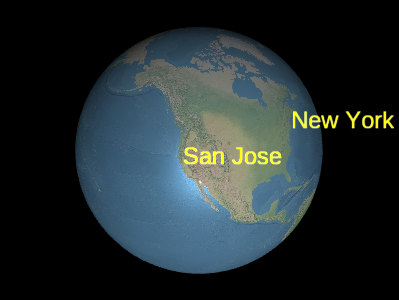
| Name | Type | Description |
|---|---|---|
options |
LabelGraphics.ConstructorOptions | optional 描述初始化选项的对象。 |
Members
backgroundColor : Property|undefined
获取或设置指定背景
Color 的 Property。
-
Default Value:
new Color(0.165, 0.165, 0.165, 0.8)
backgroundPadding : Property|undefined
获取或设置指定标签水平和垂直
背景内边距(以像素为单位)的
Cartesian2 Property。
-
Default Value:
new Cartesian2(7, 5)
readonly definitionChanged : Event
获取在属性或子属性被更改或修改时引发的事件。
disableDepthTestDistance : Property|undefined
获取或设置从相机的距离,在该距离处禁用深度测试,例如防止被地形裁剪。
当设置为零时,始终应用深度测试。当设置为 Number.POSITIVE_INFINITY 时,从不应用深度测试。
distanceDisplayCondition : Property|undefined
获取或设置指定此标签将在距相机多远处显示的
DistanceDisplayCondition Property。
eyeOffset : Property|undefined
获取或设置指定标签在视点坐标系中的偏移的
Cartesian3 Property。
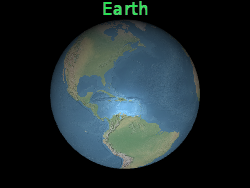
视点坐标系是一个左手坐标系,其中 x 指向观察者
右侧,y 指向上方,z 指向屏幕内部。
视点偏移通常用于在同一位置排列多个标签或对象,例如 将标签排列在其对应的 3D 模型上方。
下图中,标签位于地球中心,但视点偏移使其始终 显示在地球上方,无论观察者与地球的朝向如何。
 |
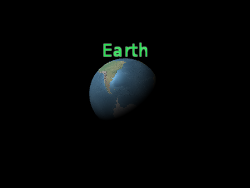 |
l.eyeOffset = new Cartesian3(0.0, 8000000.0, 0.0);-
Default Value:
Cartesian3.ZERO
fillColor : Property|undefined
获取或设置指定填充
Color 的 Property。
font : Property|undefined
获取或设置以 CSS 语法指定字体的字符串 Property。
See:
heightReference : Property|undefined
获取或设置指定
HeightReference 的 Property。
-
Default Value:
HeightReference.NONE
horizontalOrigin : Property|undefined
获取或设置指定
HorizontalOrigin 的 Property。
outlineColor : Property|undefined
获取或设置指定描边
Color 的 Property。
outlineWidth : Property|undefined
获取或设置指定描边宽度的数值 Property。
pixelOffset : Property|undefined
获取或设置指定标签屏幕空间中
相对于此标签原点的像素偏移的
The label's origin is indicated by the yellow point.
Cartesian2 Property。这通常用于对齐多个标签以及
同一位置的多个标签,例如图像和文本。屏幕空间的原点是画布的
左上角;x 从左向右递增,y 从上向下递增。
default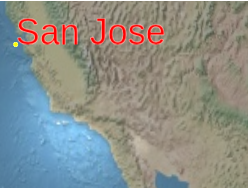 |
l.pixeloffset = new Cartesian2(25, 75);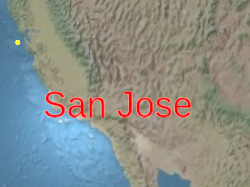 |
-
Default Value:
Cartesian2.ZERO
pixelOffsetScaleByDistance : Property|undefined
获取或设置基于距相机距离、指定标签像素偏移的
NearFarScalar Property。
当相机距离处于指定的 NearFarScalar#near 和 NearFarScalar#far 的
上下界范围内时,标签的像素偏移会在 NearFarScalar#nearValue 和
NearFarScalar#farValue 之间插值。
在这些范围之外,标签的像素偏移会保持在最接近的边界处。
scale : Property|undefined
获取或设置指定应用于图像的统一缩放的数值 Property。
大于
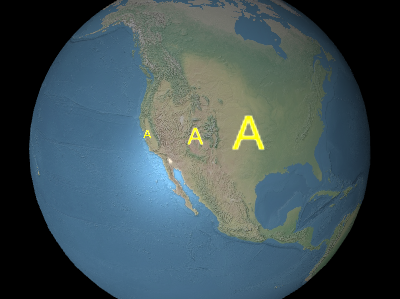
在上图中从左到右,缩放分别为
1.0 的缩放会放大标签,而小于 1.0 的缩放会缩小标签。
在上图中从左到右,缩放分别为
0.5、1.0、
和 2.0。
-
Default Value:
1.0
scaleByDistance : Property|undefined
获取或设置基于标签距相机距离的近远缩放属性。
当相机距离处于指定的
NearFarScalar#near 和 NearFarScalar#far 的
上下界范围内时,标签的缩放会在 NearFarScalar#nearValue 和
NearFarScalar#farValue 之间插值。
在这些范围之外,标签的缩放会保持在最接近的边界处。如果未定义,
scaleByDistance 将被禁用。
show : Property|undefined
获取或设置指定标签可见性的布尔 Property。
showBackground : Property|undefined
获取或设置指定标签背后背景可见性的布尔 Property。
-
Default Value:
false
style : Property|undefined
获取或设置指定
LabelStyle 的 Property。
text : Property|undefined
获取或设置指定标签文本的字符串 Property。
支持显式换行符 '\n'。
translucencyByDistance : Property|undefined
获取或设置基于距相机距离、指定标签透明度的
NearFarScalar Property。
当相机距离处于指定的 NearFarScalar#near 和 NearFarScalar#far 的
上下界范围内时,标签的透明度会在 NearFarScalar#nearValue 和
NearFarScalar#farValue 之间插值。
在这些范围之外,标签的透明度会保持在最接近的边界处。
verticalOrigin : Property|undefined
获取或设置指定
VerticalOrigin 的 Property。
Methods
clone(result) → LabelGraphics
复制此实例。
| Name | Type | Description |
|---|---|---|
result |
LabelGraphics | optional 用于存储结果的物体。 |
Returns:
修改后的结果参数;如果未提供,则为新实例。
将此对象上每个未赋值的属性赋予
所提供源对象上相同属性的值。
| Name | Type | Description |
|---|---|---|
source |
LabelGraphics | 要合并到该对象中的对象。 |
Type Definitions
LabelGraphics 构造函数的初始化选项
Properties:
| Name | Type | Attributes | Default | Description |
|---|---|---|---|---|
show |
Property | boolean |
<optional> |
true | 指定标签可见性的布尔 Property。 |
text |
Property | string |
<optional> |
指定文本的 Property。支持显式换行符 '\n'。 | |
font |
Property | string |
<optional> |
'30px sans-serif' | 指定 CSS 字体的 Property。 |
style |
Property | LabelStyle |
<optional> |
LabelStyle.FILL | 指定 LabelStyle 的 Property。 |
scale |
Property | number |
<optional> |
1.0 | 指定应用于文本的缩放的数值 Property。 |
showBackground |
Property | boolean |
<optional> |
false | 指定标签背后背景可见性的布尔 Property。 |
backgroundColor |
Property | Color |
<optional> |
new Color(0.165, 0.165, 0.165, 0.8) | 指定背景 Color 的 Property。 |
backgroundPadding |
Property | Cartesian2 |
<optional> |
new Cartesian2(7, 5) | 指定水平和垂直背景内边距(以像素为单位)的 Cartesian2 Property。 |
pixelOffset |
Property | Cartesian2 |
<optional> |
Cartesian2.ZERO | 指定像素偏移的 Cartesian2 Property。 |
eyeOffset |
Property | Cartesian3 |
<optional> |
Cartesian3.ZERO | 指定视点偏移的 Cartesian3 Property。 |
horizontalOrigin |
Property | HorizontalOrigin |
<optional> |
HorizontalOrigin.CENTER | 指定 HorizontalOrigin 的 Property。 |
verticalOrigin |
Property | VerticalOrigin |
<optional> |
VerticalOrigin.CENTER | 指定 VerticalOrigin 的 Property。 |
heightReference |
Property | HeightReference |
<optional> |
HeightReference.NONE | 指定高度所相对对象的 Property。 |
fillColor |
Property | Color |
<optional> |
Color.WHITE | 指定填充 Color 的 Property。 |
outlineColor |
Property | Color |
<optional> |
Color.BLACK | 指定描边 Color 的 Property。 |
outlineWidth |
Property | number |
<optional> |
1.0 | 指定描边宽度的数值 Property。 |
translucencyByDistance |
Property | NearFarScalar |
<optional> |
用于根据距相机的距离设置透明度的 NearFarScalar Property。 |
|
pixelOffsetScaleByDistance |
Property | NearFarScalar |
<optional> |
用于根据距相机的距离设置 pixelOffset 的 NearFarScalar Property。 |
|
scaleByDistance |
Property | NearFarScalar |
<optional> |
用于根据距相机的距离设置缩放的 NearFarScalar Property。 |
|
distanceDisplayCondition |
Property | DistanceDisplayCondition |
<optional> |
指定此标签将在距相机多远处显示的 Property。 | |
disableDepthTestDistance |
Property | number |
<optional> |
指定从相机的距离、在该距离处禁用深度测试的 Property。 |