
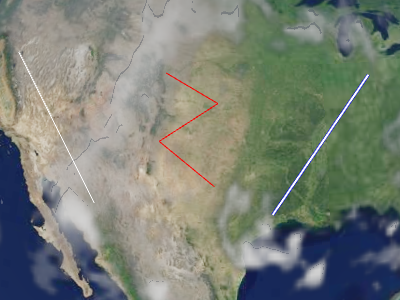
示例折线
Polylines are added and removed from the collection using
PolylineCollection#add
and PolylineCollection#remove.
Performance:
For best performance, prefer a few collections, each with many polylines, to many collections with only a few polylines each. Organize collections so that polylines with the same update frequency are in the same collection, i.e., polylines that do not change should be in one collection; polylines that change every frame should be in another collection; and so on.
| Name | Type | Description | ||||||||||||||||
|---|---|---|---|---|---|---|---|---|---|---|---|---|---|---|---|---|---|---|
options |
object |
optional
Object with the following properties:
|
Example:
// Create a polyline collection with two polylines
const polylines = new Cesium.PolylineCollection();
polylines.add({
  positions : Cesium.Cartesian3.fromDegreesArray([
    -75.10, 39.57,
    -77.02, 38.53,
    -80.50, 35.14,
    -80.12, 25.46]),
  width : 2
});

polylines.add({
  positions : Cesium.Cartesian3.fromDegreesArray([
    -73.10, 37.57,
    -75.02, 36.53,
    -78.50, 33.14,
    -78.12, 23.46]),
  width : 4
});
See:
Members
绘制该图元中每个绘制命令的包围球。
-
Default Value:
false
PolylineCollection#get 配合使用,
以遍历集合中的所有折线。
modelMatrix : Matrix4
Transforms.eastNorthUpToFixedFrame 所返回的矩阵)可使用局部参考系。
-
Default Value:
Matrix4.IDENTITY-
Default Value:
true
Methods
add(options) → Polyline
Performance:
After calling add, PolylineCollection#update is called and
the collection's vertex buffer is rewritten - an O(n) operation that also incurs CPU to GPU overhead.
For best performance, add as many polylines as possible before calling update.
| Name | Type | Description |
|---|---|---|
options |
object | optional 描述该折线属性的模板,如示例 1 所示。 |
Returns:
Throws:
-
DeveloperError : 此对象已被销毁,即已调用 destroy()。
Example:
// Example 1:  Add a polyline, specifying all the default values.
const p = polylines.add({
  show : true,
  positions : ellipsoid.cartographicArrayToCartesianArray([
           Cesium.Cartographic.fromDegrees(-75.10, 39.57),
           Cesium.Cartographic.fromDegrees(-77.02, 38.53)]),
  width : 1
});
See:
| Name | Type | Description |
|---|---|---|
polyline |
Polyline | 要检查的折线。 |
Returns:
对象一旦被销毁便不应再使用;调用除
isDestroyed 以外的任何函数都会引发 DeveloperError 异常。因此,
请像示例中那样将返回值(undefined)赋给该对象。
Throws:
-
DeveloperError : 此对象已被销毁,即已调用 destroy()。
Example:
polylines = polylines && polylines.destroy();See:
get(index) → Polyline
PolylineCollection#length 配合使用,
以遍历集合中的所有折线。
Performance:
If polylines were removed from the collection and
PolylineCollection#update was not called, an implicit O(n)
operation is performed.
| Name | Type | Description |
|---|---|---|
index |
number | 折线的从零开始的索引。 |
Returns:
Throws:
-
DeveloperError : 此对象已被销毁,即已调用 destroy()。
Example:
// Toggle the show property of every polyline in the collection
const len = polylines.length;
for (let i = 0; i < len; ++i) {
  const p = polylines.get(i);
  p.show = !p.show;
}
See:
Returns:
true,否则返回 false。
Performance:
After calling remove, PolylineCollection#update is called and
the collection's vertex buffer is rewritten - an O(n) operation that also incurs CPU to GPU overhead.
For best performance, remove as many polylines as possible before calling update.
If you intend to temporarily hide a polyline, it is usually more efficient to call
Polyline#show instead of removing and re-adding the polyline.
| Name | Type | Description |
|---|---|---|
polyline |
Polyline | 要移除的折线。 |
Returns:
true;如果在集合中未找到该折线则返回 false。
Throws:
-
DeveloperError : 此对象已被销毁,即已调用 destroy()。
Example:
const p = polylines.add(...);
polylines.remove(p);  // Returns true
See:
Performance:
O(n). It is more efficient to remove all the polylines
from a collection and then add new ones than to create a new collection entirely.
Throws:
-
DeveloperError : 此对象已被销毁,即已调用 destroy()。
Example:
polylines.add(...);
polylines.add(...);
polylines.removeAll();
See:
Throws:
-
RuntimeError : 渲染带有逐实例属性的图元需要顶点纹理获取支持。顶点纹理图像单元的最大数量必须大于零。