
3D 场景中可渲染的云的集合。
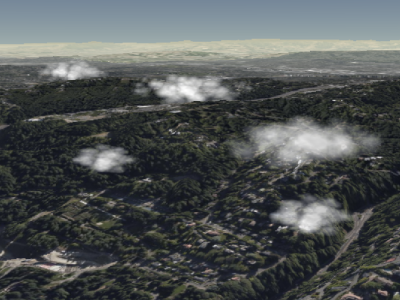
积云示例
Clouds are added and removed from the collection using
积云示例
Clouds are added and removed from the collection using
CloudCollection#add
and CloudCollection#remove.
| Name | Type | Description | ||||||||||||||||||||||||
|---|---|---|---|---|---|---|---|---|---|---|---|---|---|---|---|---|---|---|---|---|---|---|---|---|---|---|
options |
object |
optional
包含以下属性的对象:
|
Example:
// Create a cloud collection with two cumulus clouds
const clouds = scene.primitives.add(new Cesium.CloudCollection());
clouds.add({
  position : new Cesium.Cartesian3(1.0, 2.0, 3.0),
  maximumSize: new Cesium.Cartesian3(20.0, 12.0, 8.0)
});
clouds.add({
  position : new Cesium.Cartesian3(4.0, 5.0, 6.0),
  maximumSize: new Cesium.Cartesian3(15.0, 9.0, 9.0),
  slice: 0.5
});
Demo:
See:
Members
此属性仅用于调试;它不用于生产环境,也未经过优化。
为了调试,使用单一不透明颜色渲染广告牌。
-
Default Value:
false
此属性仅用于调试;它不用于生产环境,也未经过优化。
为了调试,将云绘制为不透明的单色椭球体。
如果 debugBillboards 也为 true,则椭球体会绘制在广告牌之上。
-
Default Value:
false
返回此集合中的云的数量。
控制在用于渲染积云的预计算噪声纹理中所捕获的细节量。为了使纹理可以平铺,
该值必须是 2 的幂。为了获得最佳效果,请将此值设为
8.0 到 32.0 之间(含)的 2 的幂。
clouds.noiseDetail = 8.0;
|
clouds.noiseDetail = 32.0;
|
-
Default Value:
16.0
noiseOffset : Cartesian3
对噪声纹理坐标应用平移以生成不同的数据。 如果默认噪声无法生成好看的云,可以修改此项。
default
|
clouds.noiseOffset = new Cesium.Cartesian3(10, 20, 10);
|
-
Default Value:
Cartesian3.ZERO
确定是否显示此集合中的广告牌。
-
Default Value:
true
Methods
add(options) → CumulusCloud
创建具有指定初始属性的云并将其添加到集合中。
返回被添加的云,以便之后可以修改或将其从集合中移除。
Performance:
Calling add is expected constant time. However, the collection's vertex buffer
is rewritten - an O(n) operation that also incurs CPU to GPU overhead. For
best performance, add as many clouds as possible before calling update.
| Name | Type | Description |
|---|---|---|
options |
object | optional 描述云属性的模板,如示例 1 所示。 |
Returns:
被添加到集合中的云。
Throws:
-
DeveloperError :此对象已被销毁,即已调用 destroy()。
Examples:
// Example 1:  Add a cumulus cloud, specifying all the default values.
const c = clouds.add({
  show : true,
  position : Cesium.Cartesian3.ZERO,
  scale : new Cesium.Cartesian2(20.0, 12.0),
  maximumSize: new Cesium.Cartesian3(20.0, 12.0, 12.0),
  slice: -1.0,
  cloudType : CloudType.CUMULUS
});
// Example 2: Specify only the cloud's cartographic position.
const c = clouds.add({
position : Cesium.Cartesian3.fromDegrees(longitude, latitude, height)
});See:
检查此集合是否包含给定的云。
| Name | Type | Description |
|---|---|---|
cloud |
CumulusCloud | optional 要检查的云。 |
Returns:
如果此集合包含该云则为 true,否则为 false。
See:
销毁此对象持有的 WebGL 资源。销毁对象可以确定性地释放 WebGL 资源,而不是依赖垃圾回收器来销毁此对象。
一旦对象被销毁,就不应再使用它;调用除
一旦对象被销毁,就不应再使用它;调用除
isDestroyed 以外的任何函数都会导致 DeveloperError 异常。因此,
应像示例中那样将返回值(undefined)赋给该对象。
Throws:
-
DeveloperError :此对象已被销毁,即已调用 destroy()。
Example:
clouds = clouds && clouds.destroy();See:
get(index) → CumulusCloud
返回集合中指定索引处的云。索引从零开始,
并随着云的添加而增加。移除一朵云会使它之后的所有云向左移动,
从而改变它们的索引。此函数通常与
CloudCollection#length 配合使用,以遍历集合中的所有云。
Performance:
Expected constant time. If clouds were removed from the collection and
CloudCollection#update was not called, an implicit O(n)
operation is performed.
| Name | Type | Description |
|---|---|---|
index |
number | 云的从零开始的索引。 |
Returns:
指定索引处的云。
Throws:
-
DeveloperError :此对象已被销毁,即已调用 destroy()。
Example:
// Toggle the show property of every cloud in the collection
const len = clouds.length;
for (let i = 0; i < len; ++i) {
  const c = clouds.get(i);
  c.show = !c.show;
}
See:
Returns:
如果此对象已被销毁则为
true;否则为 false。
从集合中移除一朵云。
| Name | Type | Description |
|---|---|---|
cloud |
CumulusCloud | 要移除的云。 |
Returns:
如果云已被移除则为
true;如果在集合中未找到该云则为 false。
Throws:
-
DeveloperError :此对象已被销毁,即已调用 destroy()。
Example:
const c = clouds.add(...);
clouds.remove(c);  // Returns true
See:
从集合中移除所有云。
Performance:
O(n). It is more efficient to remove all the clouds
from a collection and then add new ones than to create a new collection entirely.
Throws:
-
DeveloperError :此对象已被销毁,即已调用 destroy()。
Example:
clouds.add(...);
clouds.add(...);
clouds.removeAll();